To track your Shopify App Store listing in GA4, add your GA4 Measurement ID in your Partner Dashboard under Distribution → Manage listing → Tracking information. That gives you pageviews and the Install button click. But it only tells half the story.
A full setup has two layers, and most listings configure only the first:
Client-side events — fire when a merchant clicks Add app. Easy to set up, but they count intent, not installs. A click is not an install.
The Measurement Protocol — a server-side event Shopify sends when a merchant finishes installing. It needs a GA4 API secret, and it's the only way to see real installs in GA4.
This guide sets up both, plus the step almost everyone skips: registering event parameters as custom dimensions so the data actually shows up in your reports. Setup takes about 15 minutes.
TL;DR: Measurement ID = pageviews + button clicks. API secret = completed installs. Set up both, but treat
shopify_app_install(server-side) as your real install number — the client-side button click undercounts because of ad and consent blocking.
What GA4 tracks once your Measurement ID is live
Adding your Measurement ID makes Shopify fire a set of client-side events from your listing page. Each one is a browser-side signal — it measures what a merchant did on the page, not whether they ended up installing.
Event name | When it fires | Key parameters |
|---|---|---|
| Merchant views your app's details page |
|
| Merchant clicks the Install button |
|
| Merchant clicks Install on the listing |
|
| Merchant clicks Open on the listing |
|
Both add_to_cart and Add App button fire on the click of Install. That's the ceiling of client-side tracking: it stops at the click and never knows whether the merchant finished the OAuth screen, bounced on permissions, or clicked by accident. To see whether a click became an install, you need the second layer.
Show Image
Method 1: track the Install-button click (client-side)
The base layer. Do it first — everything else builds on it.
Log in to your Partner Dashboard.
Click Apps, then your app.
Click Distribution.
Click Create listing or Manage listing, and open the listing to edit.
In Tracking information, next to Google Analytics code (optional), enter your GA4 Measurement ID (
G-XXXXXXXXXX).Click Save.

Where to find your Measurement ID: GA4 → Admin → Data Streams → your web stream → the
G-…ID at the top right.
Within minutes, view_item and add_to_cart appear in GA4 → Reports → Realtime. You're now tracking the click. Next, the install.
Method 2: track actual installs (Measurement Protocol)
Shopify calls this full-funnel app install attribution. It runs through GA4's Measurement Protocol — a server-to-server channel. Instead of the browser firing an event, Shopify's servers send one to GA4 the moment a merchant finishes installing.
Event name | When it fires | Parameters |
|---|---|---|
| Merchant finishes installing your app |
|
| Merchant reaches your listing from a Shopify App Store ad |
|
shopify_app_install is the real install — it fires after OAuth completes, with no bots, bounces, or accidental clicks. It requires a Measurement Protocol API secret.
Generate the API secret in GA4: Admin → Data Streams → the stream matching your Measurement ID → Measurement Protocol API secrets → Create, then copy the value.
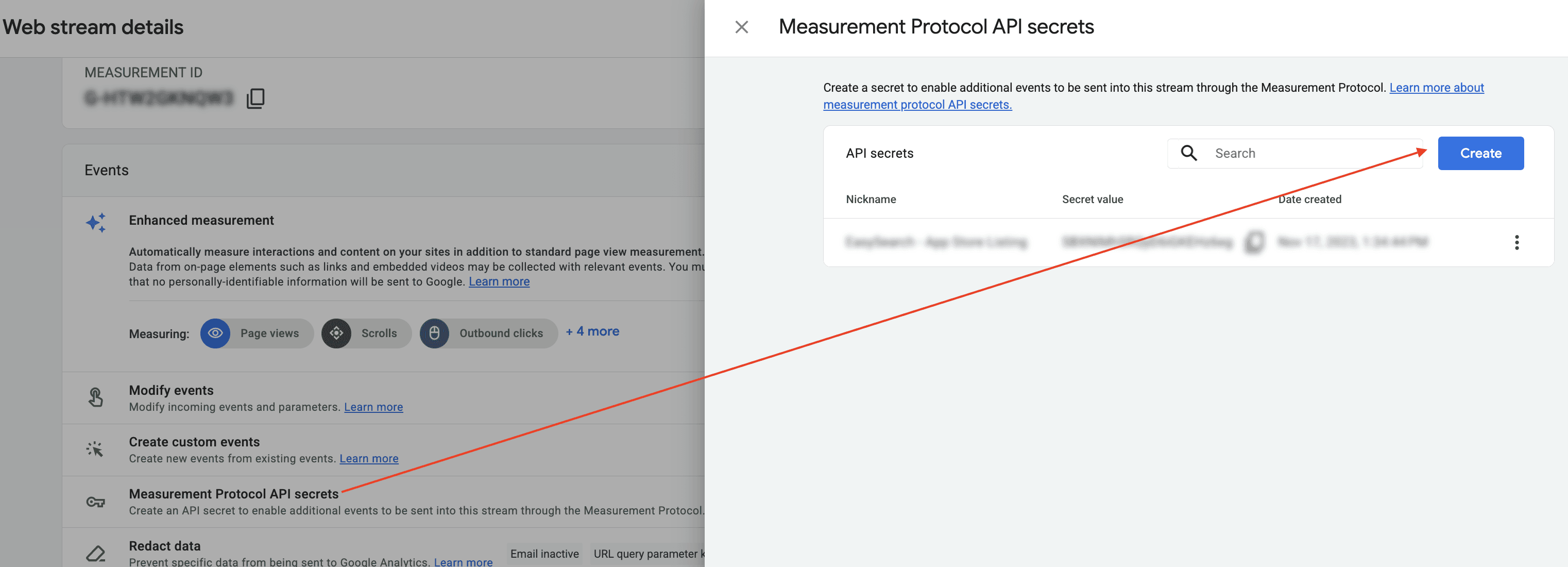
GA4 → Data Streams → Measurement Protocol API secrets → Create.
Add it to your listing: Partner Dashboard → Apps → your app → Distribution → Manage listing → Tracking information → confirm you're on GA4 → enter the API secret → Save.
From now on, Shopify sends shopify_app_install to your property on every real install.
One number to trust: the install, not the click
Once both layers are live, the button-click count and the install count won't line up — and the click is the one to distrust. Add App button is a browser event, so ad blockers, privacy browsers, consent-mode denials, and the fast redirect into the OAuth screen all suppress some of it. shopify_app_install is sent server-side by Shopify after the install completes, so none of that touches it.
Treat shopify_app_install as your source of truth for installs, and use the button click only as a lightweight signal of interest at the top of the funnel. Don't try to reconcile the two to the exact same number — they're measuring different things, and only one is reliable.
A GA4-for-Shopify quirk worth knowing: Shopify strips the referrer when a merchant clicks through from the App Store, so almost all of your listing traffic shows up as
(direct) / (none)in GA4. That's normal, not a tracking bug.
The step everyone skips: custom dimensions
The events (shopify_app_install, shopify_app_ad_click) show up in Realtime almost immediately — but their parameters (shop_name, surface_type, surface_detail…) won't appear in standard reports until you register them as event-scoped custom dimensions. Once registered, they can take up to 24 hours to populate.
We learned this the slow way: we waited two full days for the parameters to appear, and when they still hadn't, we went digging — only to find the events had been arriving correctly the whole time. GA4 just wasn't surfacing the parameters yet.
To register one: GA4 → Admin → Custom definitions → Custom dimensions → Create custom dimension → Scope: Event → Event parameter (e.g. surface_detail) → name it → Save, then allow up to 24 hours.
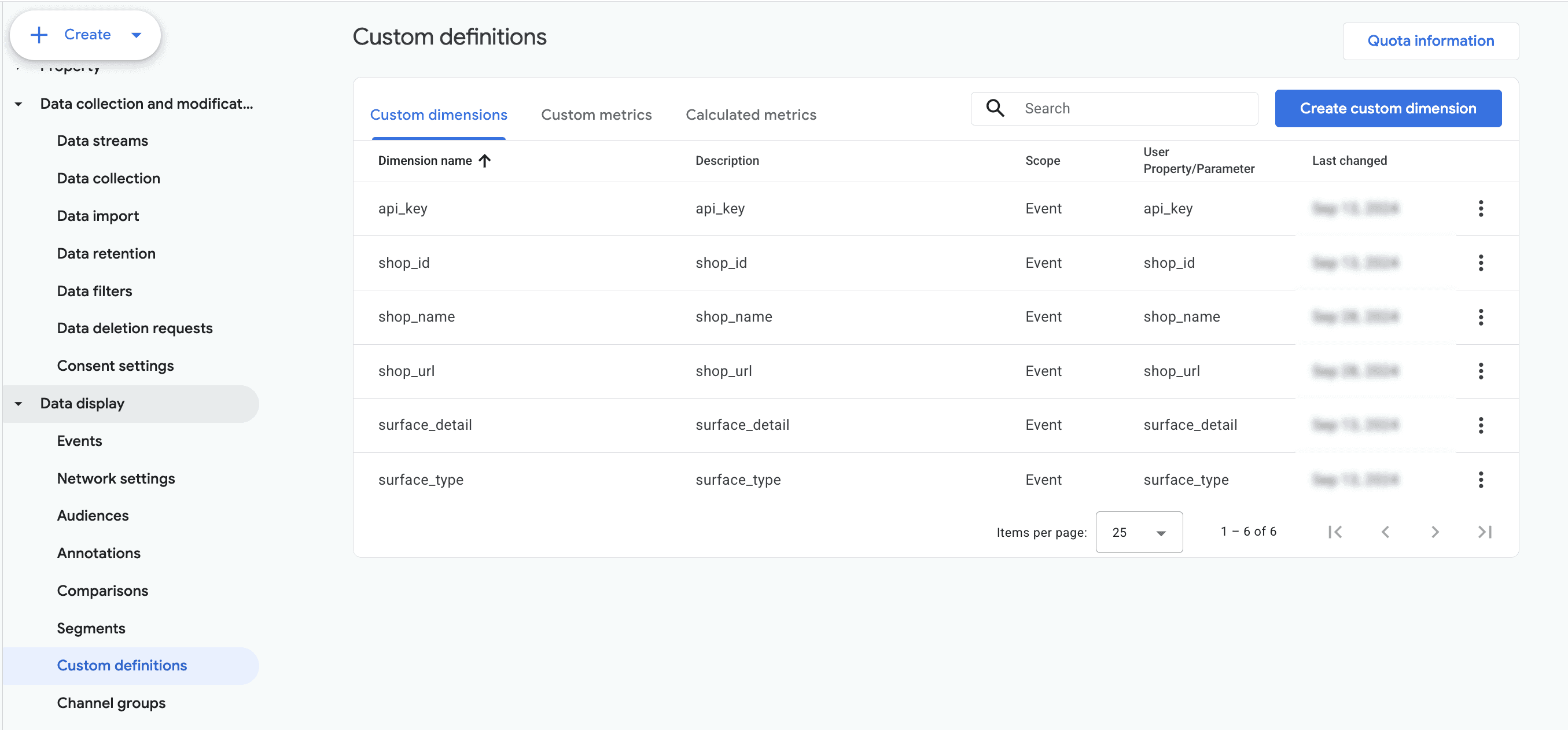
GA4 → Custom definitions → Custom dimensions, with
shop_id,shop_name,shop_url,surface_detail, andsurface_typeall registered at Event scope.
Register these first: surface_type (where the merchant came from), surface_detail (for search, the merchant's actual query), and shop_name / shop_url (which store installed).
Where your installs come from: the surface parameters
When a merchant reaches your listing from the App Store, Shopify appends URL parameters — surface_type, surface_detail, surface_intra_position — that reveal which part of the store drove the visit. The high-value pair is surface_type = search plus surface_detail (the search query): cross it with shopify_app_install and you learn which keywords actually convert, not just which ones get clicks.
That's the closest thing the App Store gives you to keyword-level attribution, and it deserves its own walkthrough.
Verify your setup
Client-side: open your listing, and
view_itemshould hit Realtime within a minute. Click Install (cancel at OAuth) →add_to_cart/Add App buttonfire.Server-side: after a real install,
shopify_app_installshows up in your Events report, confirming the API secret works.Parameters: 24 hours after registering custom dimensions, check that
surface_type/surface_detailpopulate in an exploration.Reconcile: use
shopify_app_installas your install count and check it against your Partner Dashboard. Expect it to differ from the button-click count — the client-side click undercounts, so the two won't match exactly.
FAQ
Do I need both the Measurement ID and the API secret?
Yes, for the real picture. The Measurement ID (client-side) tracks pageviews and Install-button clicks. The API secret enables the Measurement Protocol, which sends shopify_app_install when a merchant finishes installing. Without the API secret, GA4 only ever sees clicks.
Why don't my button-click and install counts match?
They measure different things, and one is unreliable. Add App button is a client-side browser event, so ad blockers, consent mode, and the fast redirect into OAuth suppress some clicks. shopify_app_install is sent server-side after the install completes, so it's the reliable count. Use the install event as your source of truth and treat the button click as a top-of-funnel signal only.
Where do I put the GA4 Measurement ID for a Shopify app?
Partner Dashboard → Apps → your app → Distribution → Manage listing → Tracking information → Google Analytics code. Enter your G-XXXXXXXXXX ID and save.
Why aren't my event parameters (like surface_detail) showing in reports?
GA4 doesn't surface event parameters until you register them as event-scoped custom dimensions (Admin → Custom definitions). After registering, allow up to 24 hours.
Can I see which search keywords drive my installs?
Partially. surface_detail Holds the merchant's search query when surface_type = search. Registered as a custom dimension and joined with shopify_app_install, it shows which queries convert — full keyword-to-revenue attribution also needs your Partner install data.